LEGAL
How Clients Opt In to Text Messages
Last updated: August 26, 2026
Why This Page Exists
Clients of Carolina Legacy Law Group, PLLC opt in to text messages inside their secure client portal, which requires a password to enter. That protects client confidentiality, but it also means the consent screen cannot be reached by anyone who is not a client — including a carrier or Campaign Registry reviewer verifying our messaging program. This page reproduces that consent experience in public so it can be reviewed without signing in. The screenshots below are taken from the live client portal, using a demonstration account with fictitious client information; the screen, the wording, and the setting are exactly what a real client sees.
Step 1 — Only Existing Clients Reach the Screen
There is no public sign-up for text messages and no keyword a member of the public can text to join. A person becomes eligible only after engaging the firm as a client, at which point the firm issues access to their own secure portal at portal.carolinalegacylaw.com. Nobody outside that group can enrol, and the firm does not buy, rent, or import phone numbers from any source.
Step 2 — The Client Opens Their Profile Page
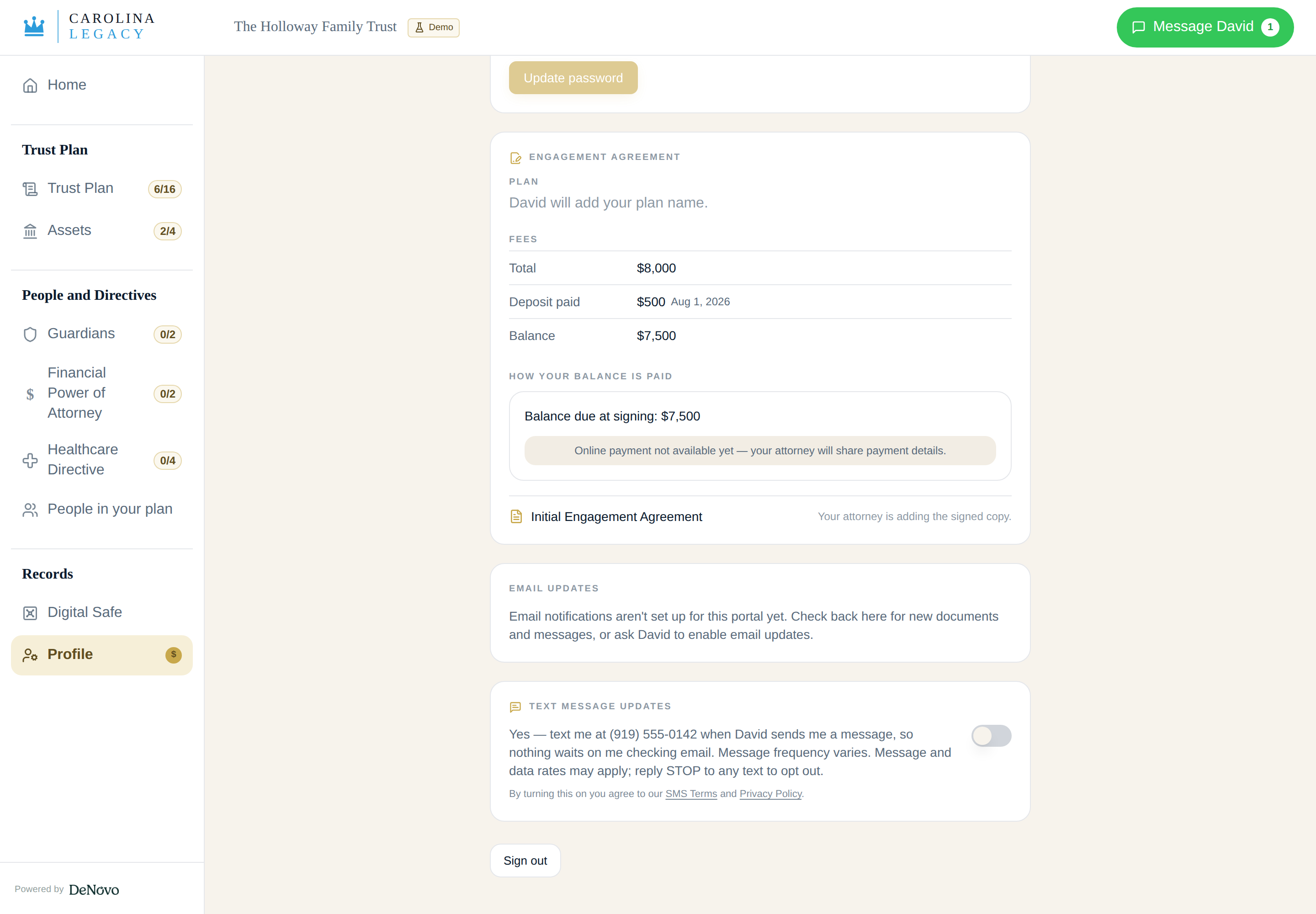
Once signed in, the client opens the Profile page of their portal. It shows their own contact details and account settings, including a section headed "Text message updates." The setting is off by default for every client. The firm cannot switch it on for a client: the system rejects any attempt to change this setting from an attorney or staff session, so consent can only ever be given by the client themselves.
Step 3 — The Client Reads the Disclosures and Turns It On
The consent control states, in the client's own words: "Yes — text me at (the client's mobile number) when David sends me a message, so nothing waits on me checking email. Message frequency varies. Message and data rates may apply; reply STOP to any text to opt out." Directly beneath it: "By turning this on you agree to our SMS Terms and Privacy Policy," with both documents linked and publicly readable at the addresses below. The mobile number that will be texted is named on the screen, so the client can see exactly which number is being enrolled. Switching the control on is the consent action; nothing else on the page or elsewhere in the portal enrols the client.
Step 4 — Consent Is Recorded, and Can Be Withdrawn
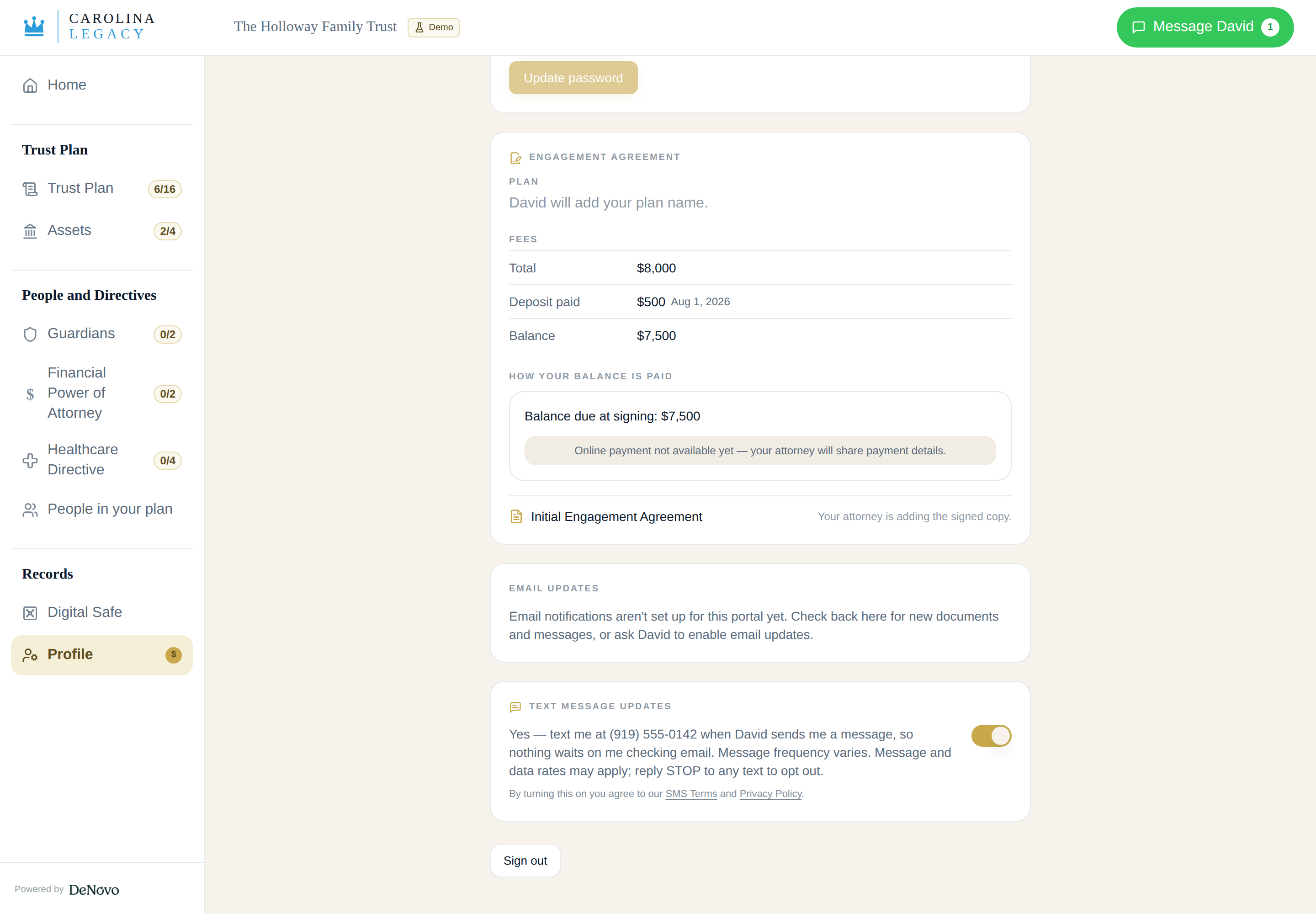
Turning the setting on stores a timestamped consent record against that client's account, which the firm retains as its record of when and how consent was given. The client may withdraw consent at any time, either by switching the same setting off or by replying STOP to any message. Both paths stop all further texts. Opting out never affects the client's legal representation, their access to the portal, or the email notifications they continue to receive.
Consent Is Never a Condition of Service
Text messaging is a convenience only. A client can engage the firm, use every part of the client portal, exchange messages with their attorney, receive documents, and pay invoices without ever turning texts on. Consent to messaging is not bundled into the engagement agreement or any other required document, and it is not requested during sign-up or checkout.
What the Messages Contain
Enrolled clients receive a text when their attorney sends them a message in the portal. Each text identifies the firm by name, directs the client to sign in to read and reply, and carries opt-out instructions. Message content, matter details, and any other confidential information stay inside the portal and are never placed in a text. Example: "New message from Carolina Legacy Law. Sign in to your client portal to read and reply: [portal link] Reply STOP to opt out." This is a transactional program; no marketing or promotional messages are sent through it.
Questions
Carolina Legacy Law Group, PLLC — david@carolinalegacylaw.com, (704) 268-9480. Reviewers verifying our messaging program are welcome to contact either directly.
Carolina Legacy Law Group, PLLC · Privacy Policy · Terms of Use · SMS Terms · Disclosure